Join PINOY365
Ready to experience the thrill of the most trusted online casino in the Philippines? Follow our simple, secure, and fast registration guide to get started in less than 2 minutes.
Click "Register Now"
Start your journey by navigating to the official PINOY365 homepage. Look at the top right corner of your screen—you will find a prominent, golden button labeled "REGISTER NOW". Clicking this button will open the secure registration portal where you can begin creating your personalized gaming account.

Expert Tip:
Always ensure you are on the official domain to keep your personal information safe. Look for the padlock icon in your browser's address bar.
Enter Mobile Number
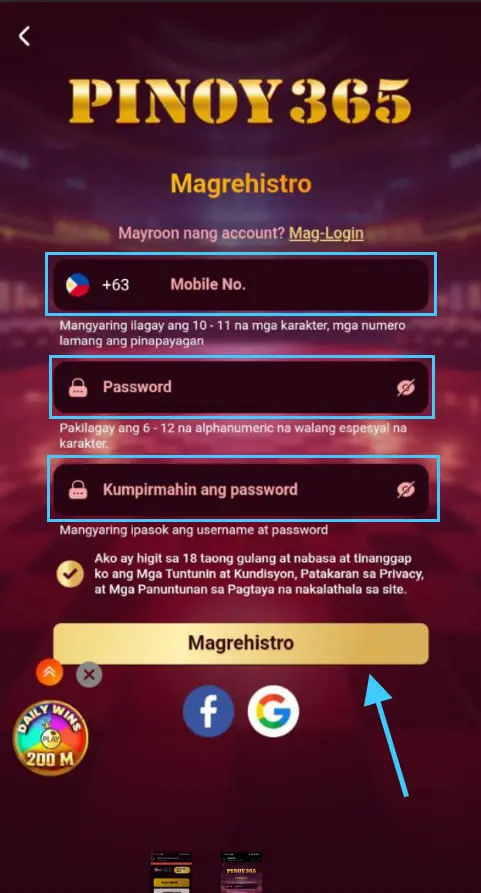
Once the registration form appears, the first field you need to fill is your Mobile Number. Ensure you use an active number as this will be your primary point of contact for account verification and future withdrawals via GCash or Maya. The format should typically follow the local Philippine standard (+63).
Set & Confirm Your Password
Security is our top priority. You will be asked to "Set Password" and then "Confirm Password" to ensure there are no typos.
Your password must be between 6 to 12 alphanumeric characters. Avoid using special characters to ensure system compatibility. Make sure both fields match perfectly before proceeding to the next step.
Password Requirements:
- Minimum 6 characters, Maximum 12 characters.
- Must be alphanumeric (Letters and Numbers).
- No special symbols allowed (e.g., @, #, $).
- Case sensitive—remember your capital letters!
Finalize Registration
Before clicking the final button, check the box confirming you are over 18 years of age and that you agree to our Terms and Conditions. Finally, click the large golden "Magrehistro" (Register) button at the bottom. Congratulations! Your account is now created and you are ready to explore our wide range of games.
Note: Multiple accounts per person are strictly prohibited. Creating duplicate accounts may lead to temporary suspension of your funds.
Registration FAQ
Can I change my mobile number later?
For security reasons, changing your mobile number requires manual verification from our 24/7 Support Team. Always use your primary number during signup.
Is my data safe with PINOY365?
Yes. We use advanced SSL encryption to ensure that your personal details and financial data are kept 100% confidential and secure.
I didn't receive a confirmation?
Most accounts are activated instantly. If you experience any issues logging in after registration, please refresh your browser or contact Live Chat.
Are there registration bonuses?
Absolutely! Check the "Promotions" tab after logging in to see the latest New Member Welcome Bonuses available for you.